1.Installation de FOG Server
sudo apt update
sudo apt install -y git
git clone https://github.com/FOGProject/fogproject.git
cd fogproject/bin
sudo ./installfog.sh
Lors de l’installation sélectionner la distribution de linux
What version of Linux would you like to run the installation for?

          1) Redhat Based Linux (Redhat, Alma, Rocky, CentOS, Mageia)
          2) Debian Based Linux (Debian, Ubuntu, Kubuntu, Edubuntu)
          3) Arch Linux

  Choice: [2] 2
Sélectionner le type d’installation à réaliser:
FOG Server installation modes:
      * Normal Server: (Choice N)
          This is the typical installation type and
          will install all FOG components for you on this
          machine.  Pick this option if you are unsure what to pick.

      * Storage Node: (Choice S)
          This install mode will only install the software required
          to make this server act as a node in a storage group

  More information:
     http://www.fogproject.org/wiki/index.php?title=InstallationModes

  What type of installation would you like to do? [N/s (Normal/Storage)] N
Définir l’interface par défaut si nécessaire:
We found the following interfaces on your system:
      * ens33 - 192.168.92.147/24

  Would you like to change the default network interface from ens33?
  If you are not sure, select No. [y/N] N
Paramétrer un serveur DHCP depuis Fog (pas nécessaire si un serveur DHCP déjà existant)
Would you like to setup a router address for the DHCP server? [Y/n] N
Prendre en considération le DNS dans les paramètres DHCP si nécessaire:
Would you like DHCP to handle DNS? [Y/n] n
Utiliser le service DHCP proposé par le serveur Fog:
Would you like to use the FOG server for DHCP service? [y/N] N
Ajouter des langues additionnels au serveur Fog?
This version of FOG has internationalization support, would
  you like to install the additional language packs? [y/N] N
Utiliser HTTPS sur le serveur fog?
Using encrypted connections is state of the art on the web and we
  encourage you to enable this for your FOG server. But using HTTPS
  has some implications within FOG, PXE and fog-client and you want
  to read https://wiki.fogproject.org/HTTPS before you decide!
  Would you like to enable secure HTTPS on your FOG server? [y/N] N
Si il est nécessaire de changer le hostname de fog, sélectionner Y
Which hostname would you like to use? Currently is: asnible-client
  Note: This hostname will be in the certificate we generate for your
  FOG webserver. The hostname will only be used for this but won't be
  set as a local hostname on your server!
  Would you like to change it? If you are not sure, select No. [y/N] y
  Which hostname would you like to use? fog-server
Autoriser ou non l’envoie des informations:
FOG would like to collect some data:
      We would like to collect the following information:
        1. OS Name (CentOS, RedHat, Debian, etc....)
        2. OS Version (8.0.2004, 7.2.1409, 9, etc....)
        3. FOG Version (1.5.9, 1.6, etc....)

  What is this information used for?
      We would like to simply track the common types of OS
      being used, along with the OS Version, and the various
      versions of FOG being used.

  Are you ok with sending this information? [Y/n]
Vérifier la configuration avec le récapitulatif puis valider avec Y
   ######################################################################
   #     FOG now has everything it needs for this setup, but please     #
   #   understand that this script will overwrite any setting you may   #
   #   have setup for services like DHCP, apache, pxe, tftp, and NFS.   #
   ######################################################################
   # It is not recommended that you install this on a production system #
   #        as this script modifies many of your system settings.       #
   ######################################################################
   #             This script should be run by the root user.            #
   #      It will prepend the running with sudo if root is not set      #
   ######################################################################
   #            Please see our wiki for more information at:            #
   ######################################################################
   #             https://wiki.fogproject.org/wiki/index.php             #
   ######################################################################
   #                    or our new documentation at:                    #
   ######################################################################
   #               https://docs.fogproject.org/en/latest/               #
   ######################################################################

 * Here are the settings FOG will use:
 * Base Linux: Debian
 * Detected Linux Distribution: Debian GNU/Linux
 * Interface: ens33
 * Server IP Address: 192.168.92.147
 * Server Subnet Mask: 255.255.255.0
 * Hostname: fog-server
 * Installation Type: Normal Server
 * Internationalization: No
 * Image Storage Location: /images
 * Using FOG DHCP: No
 * DHCP will NOT be setup but you must setup your
 | current DHCP server to use FOG for PXE services.

 * On a Linux DHCP server you must set: next-server and filename

 * On a Windows DHCP server you must set options 066 and 067

 * Option 066/next-server is the IP of the FOG Server: (e.g. 192.168.92.147)
 * Option 067/filename is the bootfile: (e.g. undionly.kkpxe or snponly.efi)
 * Send OS Name, OS Version, and FOG Version: Yes


 * Are you sure you wish to continue (Y/N) Y
Accéder à la page de management http://192.168.92.147/fog/management
Effectuer l’initialisation de la base de donnée.
Important
Il est nécessaire après l’initialisation de la basse de donnée de retourner sur le terminal d’installation et d’appuyer sur
Entréepour terminer l’installation.
Connecter à l’interface web avec les identifiants par défaut : fog/password
2. Script de sauvegarde de base de données
3. Modifier le service DHCP pour boot via PXE
Optionnel
Si le service DHCP de FOG est utilisé, passer cette étape
Ajouter les options nécessaires pour que Fog puis boot depuis le PXE:
option space dhcp;
option user-class code 77 = text;
option architecture-type code 93 = unsigned integer 16;
Ajouter ensuite dans le même fichier les différentes options en fonction du boot EUFI ou BIOS ainsi que l’adresse du serveur Fog.
next-server 192.168.92.147;    # Pointer serveur Fog

if option architecture-type = 00:00 {
    filename "undionly.kpxe";        # Pour les machines BIOS
} elsif option architecture-type = 00:07 {
    filename "ipxe.efi";             # Pour les machines UEFI 64-bit
} elsif option architecture-type = 00:09 {
    filename "ipxe.efi";             # Pour les machines UEFI 64-bit (variante)
} else {
    filename "undionly.kpxe";        # Par défaut
}
Tester la configuration avec la commande suivante:
dhcpd -t -cf /etc/dhcp/dhcpd.confS’il n’y a aucune erreur, redémarrer le serveur DHCP:
sudo systemctl restart isc-dhcp-server
sudo systemctl status isc-dhcp-server
4. Paramètres à modifier sur l’interface Fog
a. Menu Timeout
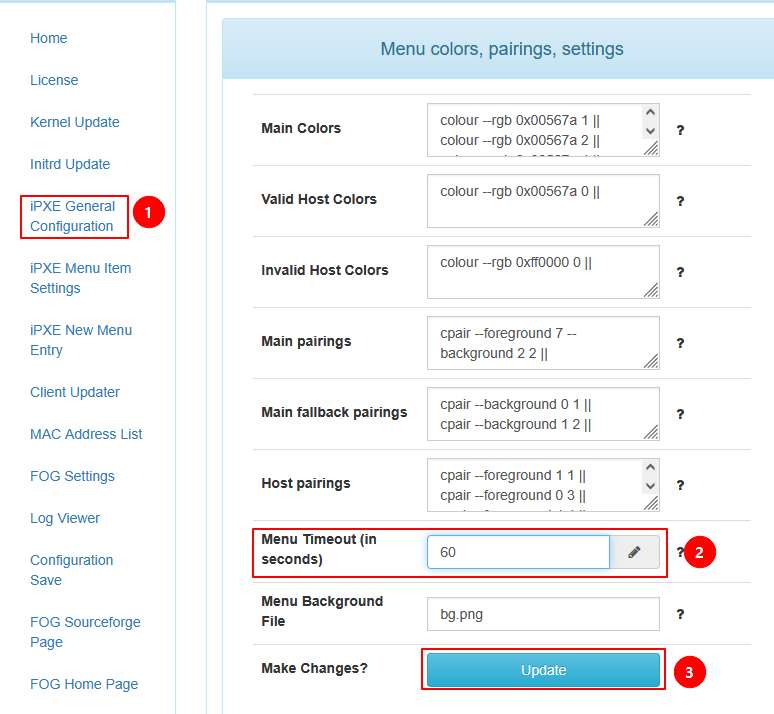
Aller dans Fog configuration > iPXE General Configuration > Menu colors, pairings, settings
Modifier le paramètre Menu Timeout en passant à 60 secondes.
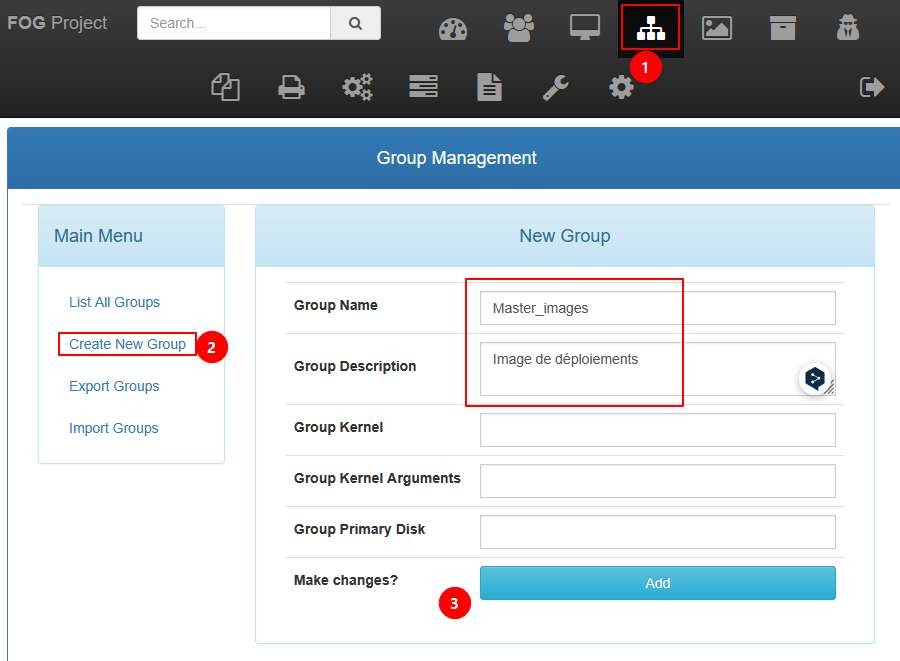
5. Création d’un groupe d’images
Aller dans le menu Groups > Create New Group, remplir les champs et cliquer sur Add.